
Pay My Tuition
The University of Houston-Downtown has partnered with PayMyTuition for international tuition payments. With PayMyTuition, you can pay your tuition from any bank, in any country, in any currency — at better-than-bank exchange rates. It’s fast, simple, and cost-effective.
International Payments
If you are an international student, you can pay your tuition and fees from any bank, in any country, in any currency — at a better rate than bank exchange rates.
International payment options include:
| Payment Method | Estimated Time for Payment Confirmation |
|---|---|
| Bank transfers | 2–10 business days** |
| Debit and credit cards in your home currency | 2–3 business days |
| eWallet payments | 2–3 business days |
| Plus, other local options (if available) | 2–3 business days |
** Anticipated timelines vary by country.
How to Make an International Payment
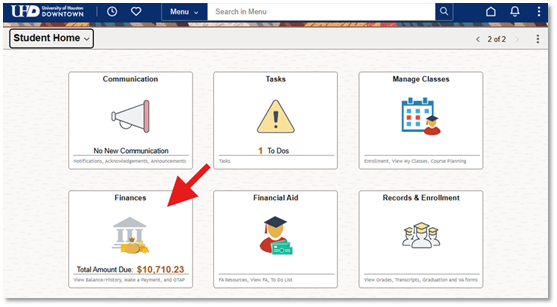
- Log into the myUHD Student Login portal. Upon signing in, select the Finances tile.
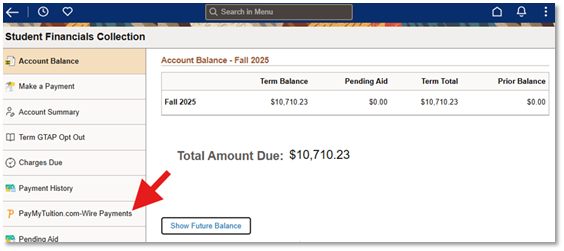
- From the navigation panel, select PayMyTuition.com-Wire Payments.
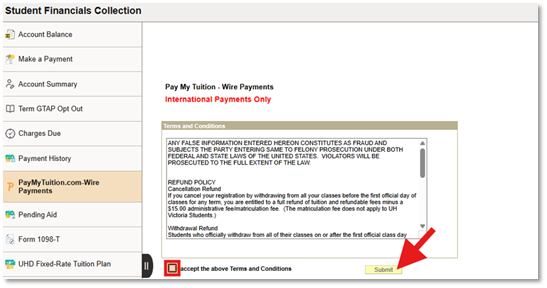
- Next, accept the Terms and Conditions and click Submit to be redirected to the PayMyTuition portal.
- Once redirected to the PayMyTuition portal, select the MAKE PAYMENT button in the Payment Center to initiate your transaction.
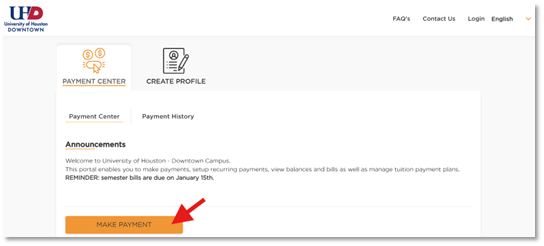
Follow the on-screen instructions to create and fund your payment to the University of Houston-Downtown.
Step-by-step Payment Instructions (Translated PDFs)
To support you with using PayMyTuition, download these helpful step-by-step PDF instructions in multiple languages:
- English
- French
- Spanish
- Portuguese
- Vietnamese
- Japanese
- Korean
- Simplified Chinese
- Traditional Chinese
- Arabic
- Punjabi
- Hindi
- Farsi
- Turkish
- German
- Swedish
- Dutch
Additional Information on PayMyTuition
- Frequently Asked Questions
- PayMyTuition’s Rate Guarantee for International Payers
- How to Add an Authorized User to the Students’ PayMyTuition Account