
Ergonomics
Ergonomics is defined as the science of work. It is study of the relationship between workers and their environments, especially, the equipment used. By implementing sound ergonomic principles i.e. adapting the employee's work environment, work tools and activities to the employee, barriers to quality, productive, and safe human performance can be removed.
Sound ergonomics maximizes employee job function and productivity, prevents injuries, improves employee comfort, promotes return to work after an injury, and accommodates an employee with injuries or disabilities to perform his/her work tasks.
Back pain is one of the most common work-related injuries and is often caused by ordinary work activities such as sitting in an office chair or heavy lifting. Applying ergonomic principles (the study of the workplace as it relates to the worker) can help prevent work-related back pain and injury, and help maintain a healthy back.
The goal of an ergonomics program in industry is to adapt the workplace to a specific worker, dependent on the job description, required tasks and physical make up of the employee performing those tasks. Two types of situations typically cause people to begin having back pain or to sustain a back injury while on the job.
- Non-accidental injury, where pain arises as a result of normal activities and requirements of the task. Poor body mechanics (such as slouching in an office chair), prolonged activity, repetitive motions, and fatigue are major contributors to these injuries. This may occur from sitting in an office chair or standing for too long in one position.
- Accidental injury results when an unexpected event triggers injury during the task. A load that slips or shifts as it is being lifted, slip and fall or hitting one’s head on a cabinet door are typical examples. These accidents can jolt the neck, back and other joints with resulting muscle strain or tearing of soft tissue in the back.
People who sit most of the day, such as those who work at a computer while sitting in an office chair, are at risk for non-accidental back injury. Office ergonomics, or computer ergonomics, can help minimize the risk of injuries such as:
- Carpal tunnel syndrome from repetitive keystrokes, or
- Neck strain, lower back pain and leg pain from prolonged sitting in an office chair.
Staying physically fit, strong and flexible improves the likelihood of avoiding back injuries in all types of work environments.
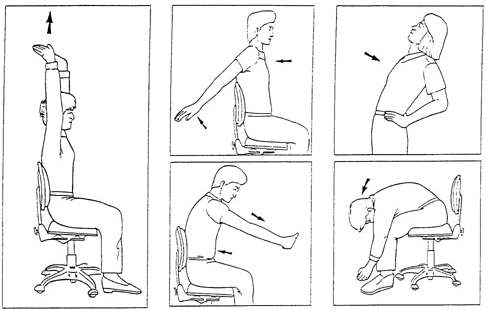
- Office Ergonomic Checklist - Self assessment checklist that covers your office chair, keyboard, mouse, work surface, monitor, workstation accessories and work habits.
- SORM Office Ergonomics Video - Video presentation by the State Office of Risk Management on workstation adjustments that improve ergonomics.
- SORM Chair Adjustment Guide - Video presentation by the State Office of Risk Management on chair adjustments that improve ergonomics.