
End of Month (EOM) Close - Budget Adjustments
Purpose
This guide primarily addresses the budget-related aspects of UHD’s end-of-month (EOM) close process. Following these standard business practices help ensure compliance with UHS financial deadlines and university financial reports are accurate and current for decision making.
Budget Adjustments
Budget journals to adjust position budgets can only be posted within the current calendar month and cannot be backdated. In other words, the budget journal date must be a date within the current calendar month and cannot be a date from any previous month. For example, a budget journal adjusting a position’s budget with a March date cannot be posted in April.
If position budget adjustments are desired to be reflected on March Finance and BOB reports, the budget journals must be posted by the Budget Office within the month of March (1st through the 31st).
As such, budget adjustments for EOM close must be for non-position budgets only, such as B5007, B5008, B5009, B5066, B5076 and any revenue budgets.
All month‑end budget adjustment activities are completed in PeopleSoft Finance.
Roles and Responsibilities
Budget Office
Position budget adjustments
Business Administrators
Non-position budget adjustments
EOM Close Schedule
Approximately a week before each calendar month ends, UH emails an EOM Close Schedule to UHD business offices.
Subsequently, the UHD Budget Office shares the EOM Close Schedule with university business administrators via email.
✅ Always review the schedule and plan your work around the published deadlines.
Example: The EOM Close Schedule for March 31, 2026
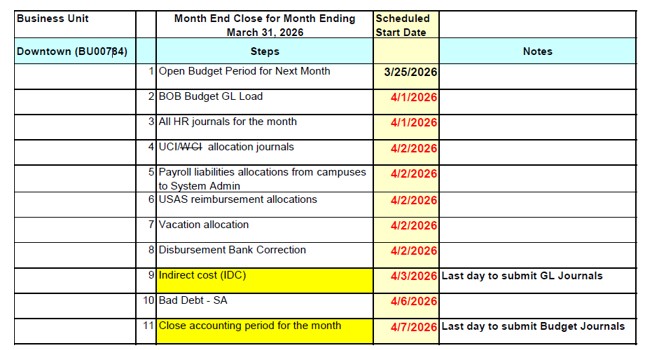
Step 2 BOB Budget GL Load
Budget journals adjusting position budgets posted in Finance within the closing calendar month is extracted.
Step 4 UCI/WCI Allocation Journals
Payroll assessments for Unemployment Compensation Insurance (UCI) and Workers' Compensation Insurance (WCI) are initiated. Assessment percentage rate is determined by UHD Budget Office and is assessed against all salary & wage expenses posted in each cost center.
Step 9 Indirect Cost (IDC)
Indirect cost process is initiated based on expenditures posted within the closing calendar month.
Note: Expenditures should not be moved for the closing month in Finance once the IDC process is initiated.
What To Do Before Month‑End Close
Step 1: Run PeopleSoft Finance Reports
- Run 1063 Budget Summary report
- Run 016 Fund Equity report
- Run 1074 Department Verification reports to view transaction details, if needed
Step 2: Review Activity
Check for accuracy and reasonableness in:
- Budgets
- Revenues
- Payroll expenses
- Non-payroll expenses
- Fund equity balances
Step 3: Fix Issues
- Identify errors, missing entries, or misclassified transactions
- Prepare budget journals and/or general ledger journals as needed
- Ensure negative expense budget balance available (BBA) amounts by budget nodes are addressed
EOM Close Budget Journals
UHD Budget Office expectations for EOM close budget adjustments:
- Resolve negative expense budgets by:
- Transferring budget from one within a cost center or from another cost center
- Recognizing Revenue
- Recognizing Fund Balance (also known as a Carry Forward)
- Recognizing Revenue
- The process of increasing the appropriate revenue budget to match actual revenues posted
- To ensure budget is balanced and realized revenue can be expended, this process also includes increasing the expense budget by the same amount
- Recognizing Fund Balance
- Also known as a Carry Forward or Budgeting Fund Balance
- The process of budgeting all or a portion of a cost center’s fund equity to spend in the current fiscal year
- Involves increasing the Fund Balance budget node (B4035) and increasing an expense budget node
- Budget increases to B4035 and expense budget typically occurs within the same cost center, but can be increased in different cost centers
Timely Submission of Budget and GL Journals
- GL Journals
- Submitted to General Accounting by close of business, typically 2 business days before EOM close date. Refer to EOM Schedule for exact deadlines.
- Non‑Position Budget Adjustments
- Submitted to the Budget Office by noon on the day EOM close. Refer to EOM Schedule for exact deadlines.
⚠️ Late submissions will be denied and will have to be resubmitted.
After the Month Closes
Once the accounting period is closed:
- Run final Finance reports
- Review results for accuracy
- Analyze trends and variances
- Save reports and documentation for audit and/or management review
Best Practices for Success
✅ Start reviews early
✅ Monitor your budget regularly
✅ Communicate issues promptly
✅ Keep documentation organized
Need Help?
- Budget journal questions: budgetoffice@uhd.edu
- GL journal questions: businessaffairs@uhd.edu